 Tikpilot
An alternative to The Dude for a MikroTik fleet
Written for people with dozens of routers spread across remote sites. What The Dude is good at, where it stops helping, and what to put next to it or instead of it.
First, what The Dude gets right
Opening with its faults would not be honest.
- It is free and comes from MikroTik itself, installed as a package on a router.
- It finds devices on the network by itself and draws the links between them.
- It polls over SNMP and ICMP, so it sees more than MikroTik: switches, printers, servers.
- For one network in one building that is usually enough, and there is little reason to replace it there.
Where it stops helping
Not because it is bad, but because the job is a different one.
The difference shows up once there are many sites and they are not connected to each other. Fifty shops, canteens and dormitories are not one network, they are fifty independent networks, each behind its own provider. The map of links, the very thing The Dude exists for, shows fifty separate icons and explains nothing.
Then comes the work that has no place in that picture at all. Upgrade RouterOS on every site. Collect the configuration from all of them and compare today's against yesterday's. Push one script to forty-nine devices and see which three failed and why. Hand the person renting the channel a document with the uptime for the month. All of it is done by hand, one device at a time.
What covers what
| Task | The Dude | Tikpilot |
|---|---|---|
| Network map, autodiscovery, SNMP | Yes, this is its strength | No, and not planned |
| Fifty remote sites as one list | A map rather than a list | List, groups, a needs-attention block on top |
| RouterOS upgrade across the fleet | One device at a time | One job over the selected sites, a result per device |
| Scheduled backups | Yes, configured separately | Binary copy and text export, N copies per device, diff between any two configs, full-text search across all of them |
| Running scripts in bulk | One device at a time | A script library, run on the selected, see where it failed |
| Availability report for a period | Assembled by hand | A printable document for the fleet or for one site |
| Alerts | Yes, its own | Telegram, with hold times, quiet hours and a digest |
| Working from a phone | A Windows application | A web panel, phone included |
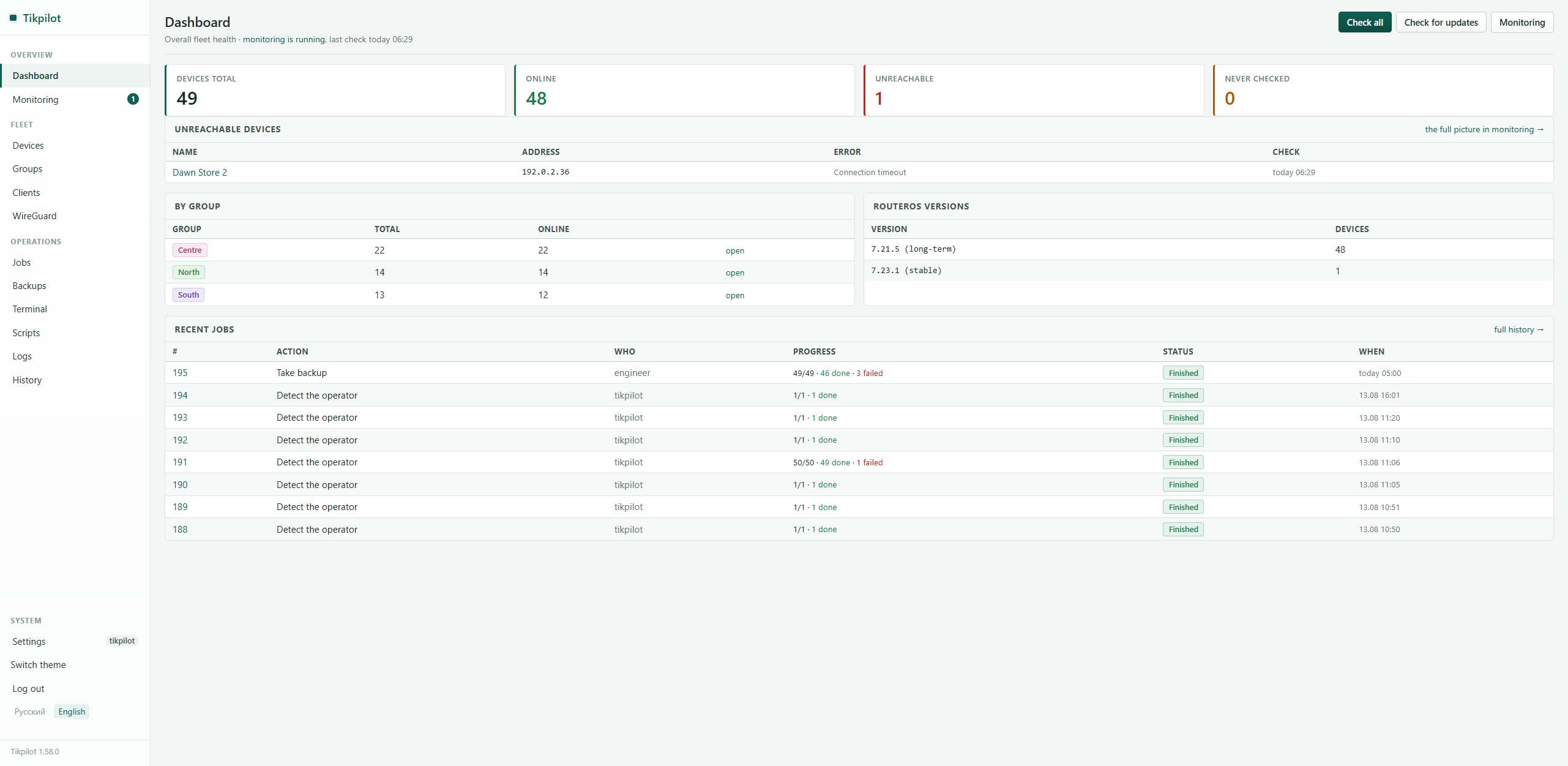
Instead of a map of links, a list of what to deal with today. Taken from a live fleet of 49 routers; names and addresses are replaced by the panel itself.
What Tikpilot does not do
So that you do not find out after installing it.
- It does not draw topology and does not discover devices. Sites are added by hand or imported from a CSV file.
- It does not poll SNMP and speaks nothing but MikroTik. Printers, switches from other vendors and servers are out of scope.
- It does not replace WinBox. Fine-tuning a single site still happens there; the panel takes over the repetitive work across the fleet.
If a map with autodiscovery is what you actually need, look at Zabbix, LibreNMS or The Dude itself. These are different jobs, and pretending one program covers both would be a lie.
Moving over without throwing The Dude away
You do not have to choose. The Dude polls over SNMP and ICMP, the panel talks to the RouterOS API, nothing on the routers has to change, and neither of them knows about the other. A sensible order:
- Install the panel on any machine nearby, add five sites by hand and watch it for a week.
- Import the rest from a CSV file: name, address, login, group.
- Turn on scheduled backups. That is the part that pays for itself first.
- Then decide for yourself whether you still need the map.
git clone https://github.com/maximdr86/tikpilot
cd tikpilot && cp .env.example .env
docker compose up -dFrequently asked
Is The Dude discontinued?
No. It ships with RouterOS and it is still free. The question is not whether it is alive, but what it was built for: a map of one network, not fifty independent sites.
Can I run both?
Yes, they look at the network from different sides and do not interfere.
Does the panel draw a network map?
No, deliberately. It shows a list of sites and their state.
What do the routers need for this to work?
The API enabled and a dedicated user. No agent, no REST service, no certificates.